




Signing documents via Documentolog API
Fast launch and legal force
Document

In progress

Signing

Completed
About the integration
Legally significant document signing in your product
Who this solution is for:
Banks and fintech companies: loan agreements, contracts, supplementary agreements, etc.
B2B SaaS systems: contracts, acts, and NDAs
Marketplaces: reconciliation acts, contracts with sellers/buyers,
Other types of companies
Documentolog API capabilities:
Creating documents and sending them for signing via API request
Using the legally significant Documentolog infrastructure
Support for multiple signing methods: EDS, Egov QR, SMS, Adobe Sign
Embedding the signing process via iframe into your interface
Receiving the signing result via Webhook
Process description
Sending and signing a document
- The initiator uploads the contract file to the system — PDF, Word, Excel and other formats are supported.
- The initiator specifies the recipient — by phone number, IIN, BIN, or email.
- The initiator chooses the sending type: view only or signing.
- The initiator clicks «Send» and, if necessary, signs the document themselves — after which the document is sent to the recipient.
- The recipient receives a link or notification and opens the document on their device. If the recipient is registered in Documentolog Business, the document will appear in their system automatically.
- The recipient independently chooses a convenient signing method and signs the document.
- The initiator receives a notification about the signing and the finalized file
The recipient did not sign the document
The recipient opens the document on their device:
- If the recipient decides not to sign — they click «Reject». The initiator immediately receives a notification and can contact the recipient to clarify the reasons.
- If the recipient closed the document without making a decision — the link remains active for 30 days. The initiator sees the «Not signed» status and can send a reminder.
Developer documentation
This documentation describes the process of obtaining an access token and using it for embedding into an iframe.
This is necessary for working with documents and signing them via API
To begin integration, you need to register in the system:
On the https://documentolog.com/ website, click "Start for free" and register in the Documentolog Business system.
To gain access to the Documentolog API, you need to purchase the Business plan. More details: https://documentolog.com/tariffs
After paying for the plan, go to the "Integrations" section
Go to the "API Documentolog" tab
Part 1: Getting the Access Token
1.1 Access Token request
To get the access token, execute the following cURL request:
36 lines
01
02
03
04
05
06
07
08
09
10
11
12
13
14
15
16
17
18
19
20
21
22
23
24
25
26
27
28
29
30
31
32
33
34
35
36
curl --location 'https://apiv1dlkz.doculite.kz/json/external/oauth/token' \
--header 'api-key: {{api-key}}' \
--header 'Content-Type: application/json' \
--data '{
"aAttachments": [
"https://dlkz.doculite.kz/rct/sample.pdf"
],
"sSetWebhookUrl": "https://your-server.com/webhook",
"iSendToRecipient": 1,
"mRecipient": [
"000000000000"
],
"mPhonesForSms": [
{
"enableBMG": false,
"phone": "+X (XXX) XXX-XX-XX",
"fio": "Simple name",
"iin": "",
"type": "sms"
}
],
"iRecipientSignatureRequired": 1,
"mAvailableSignatureMethodsForRecipient": [
"eds",
"egov-qr",
"adobe-sign",
"sms"
],
"mAvailableSignatureMethods": [
"eds",
"egov-qr",
"adobe-sign",
"sms"
],
"sSender": "000000000000"
}'
1.2 Request parameters
Request body parameters:
aAttachments — array of links to files that need to be signed
sSetWebhookUrl — URL to receive a webhook notification after signing
iSendToRecipient — flag to send the document to the recipient (1 — send)
mRecipient — array of IINs of the document recipients
mPhonesForSms — SMS signing parameters for recipients
enableBMG — whether to use the BMG service for sending SMS
phone — recipient phone number in the format +X (XXX) XXX-XX-XX
fio — full name of the recipient
iin — IIN of the recipient
type — sending type (sms)
iRecipientSignatureRequired — whether the recipient's signature is required (1 — yes)
mAvailableSignatureMethodsForRecipient — available signing methods for the recipient
mAvailableSignatureMethods — available signing methods for the sender
sSender — IIN of the document sender
1.3 Request result
If the request is successful, you will receive a JSON response with the status and token data:
8 lines
01
02
03
04
05
06
07
08
{
"status": 1,
"data": {
"access_token": "eyJ0eXAiOiJKV1QiLCJhbGciOiJIUzI1NiJ9...",
"scope": "document-create|document-sign|document-show",
"token_type": "Bearer"
}
}
access_token — JWT token for iframe authorization
scope — allowed operations (create, sign, view)
token_type — token type (Bearer)
Part 2: Embedding the token into iframe
After receiving the access_token, form the URL for the iframe and embed it into your page.
Form the URL by substituting the access_token value from the response:
1 line
01
https://apiv1dlkz.doculite.kz/external/sign/embedded?sParams={{data.access_token}}
Example of embedding iframe in HTML:
1 line
01
<iframe src="https://apiv1dlkz.doculite.kz/external/sign/embedded?sParams=eyJ0eXAiOiJKV1QiLCJhbGciOiJIUzI1NiJ9..." width="400px" height="600px"></iframe>
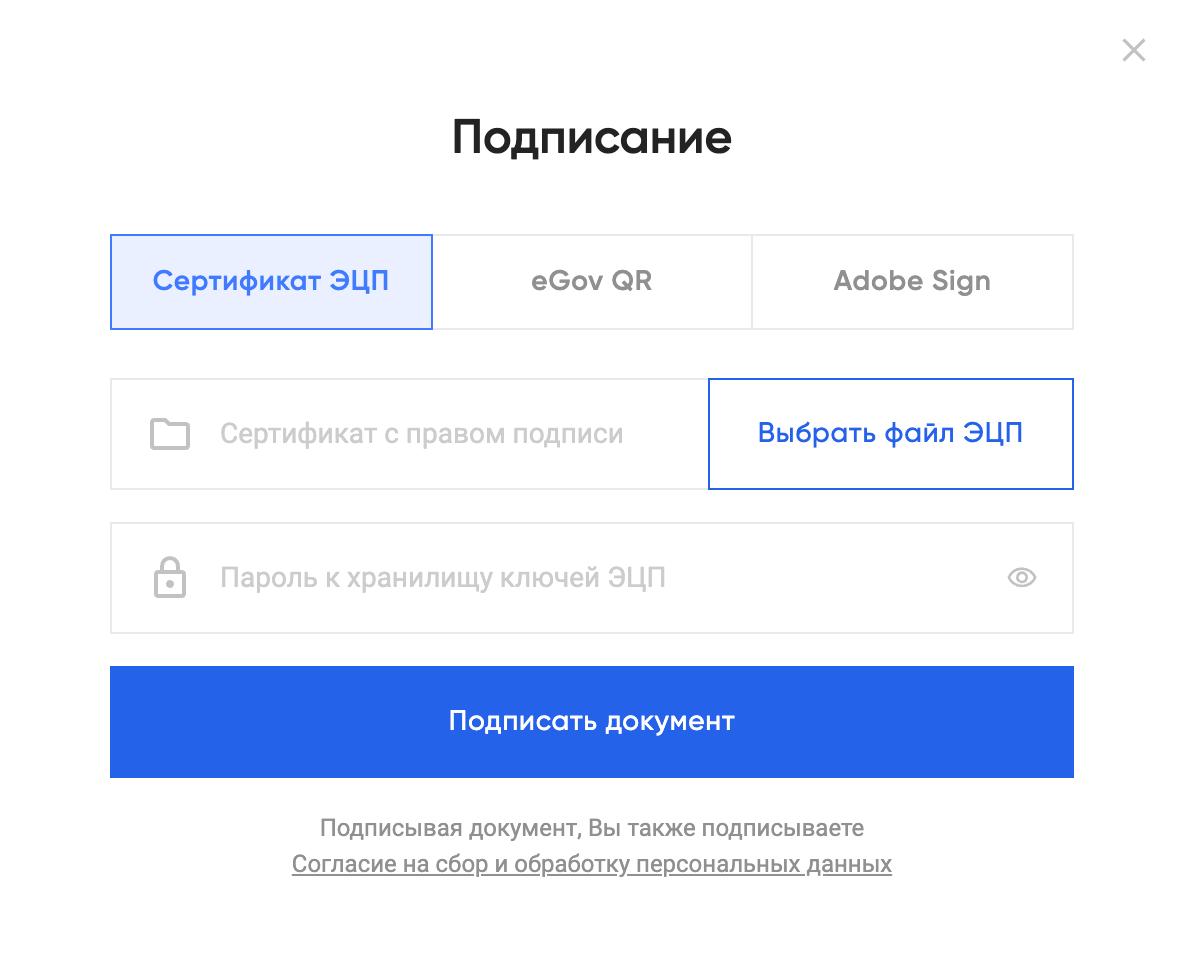
Appearance of the iframe for signing the document
Part 3: postMessage event
3.1 Signing result
After the document is signed, the iframe sends a postMessage event with the result. Subscribe to the 'message' event to receive the data:
6 lines
01
02
03
04
05
06
{
isDocumentolog: true,
type: 'sign',
success: true | false,
signType: 'eds' | 'egov_gr'
}
isDocumentolog — flag indicating the event belongs to Documentolog
type — event type
success — operation result (true — success, false — error)
signType — signing method (eds or egov_gr)
3.2 User closed the iframe
If the user closed the signing form without signing, a separate message is sent:
5 lines
01
02
03
04
05
{
isDocumentolog: true,
type: 'user-close',
success: false,
}
isDocumentolog — flag indicating the event belongs to Documentolog
type — event type
success — operation result (true — success, false — error)
3.3 Document already signed
If the document opened in the iframe has already been signed, the following message is sent:
5 lines
01
02
03
04
05
{
isDocumentolog: true,
type: 'already-signed',
success: true,
}
type — event type
success — operation result (true — success, false — error)
Part 4: Webhook
4.1 Webhook events
While working with the document, POST requests with information about key events are sent to the URL specified in the sSetWebhookUrl parameter:
4 lines
01
02
03
04
{
"event": "document_sent",
"doc_id": "KZ000000000000000001234567"
}
8 lines
01
02
03
04
05
06
07
08
{
"event": "signer_signed"|"signer_declined",
"doc_id": "KZ000000000000000001234567",
"signer": {
"name": "Сейтқали Нұрлан",
"recipient": "000000000000"
}
}
event — event type (document_sent, signer_signed, signer_declined)
doc_id — document identifier
signer — signer data
name — full name of the signer
recipient — IIN of the signer
4.2 Signing completion
After all parties complete signing the document, a final event is sent to the webhook URL with links for viewing and downloading the files:
24 lines
01
02
03
04
05
06
07
08
09
10
11
12
13
14
15
16
17
18
19
20
21
22
23
24
{
"event": "document_completed",
"doc_id": "KZ000000000000000001234567",
"document": "https://apiv1dlkz.doculite.kz/external/document/view-document/dcs_universal_type/1234",
"download_all_files": "https://apiv1dlkz.doculite.kz/external/media/download-many?files=4444",
"download_files": [
{
"name": "sample.pdf",
"link": "https://apiv1dlkz.doculite.kz/external/media/download/4444"
}
],
"download_files_with_eds": [
{
"name": "sample.pdf",
"link": "https://apiv1dlkz.doculite.kz/external/media/download-eds/dcs_universal_type/1234/4444"
}
],
"download_files_with_eds_ez": [
{
"name": "sample.pdf",
"link": "https://apiv1dlkz.doculite.kz/external/media/download-eds-ez/dcs_universal_type/1234/4444"
}
]
}
event — event type (document_completed)
doc_id — document identifier
document — link to view the document
download_all_files — link to download all files in a single archive
download_files — list of files to download
download_files_with_eds — list of files with attached EDS signatures
download_files_with_eds_ez — list of files with EDS signatures in Ez format